How to stop your PS5 from overheating

Is your PS5 overheating? Learn the most common causes, warning signs, and practical solutions to keep your console cool and performing at its best.
On this page
Nothing kills the mood faster than a temperature warning popping up right in the middle of a game. One minute everything is running fine, and the next your PS5 is telling you it needs to cool down.
The thing is, heat isn’t automatically a problem. Every PS5 gets warm during gameplay, especially when you’re running newer titles with 4K visuals, ray tracing, or higher frame rates. That’s normal. What isn’t normal is when temperatures start climbing high enough to affect performance or force the console to shut itself down.
If you’ve been wondering how to stop PS5 from overheating, it helps to understand what’s usually behind it.
Why your PS5 gets too hot
If you’re wondering how to stop PS5 from overheating, it’s important to understand the most common causes. The PS5 packs a lot of power into a relatively compact piece of hardware. Naturally, that creates heat. Most of the time the cooling system handles it without any issues, but a few common factors can make its job much harder.
Poor airflow. The PS5 constantly pulls cool air in and pushes hot air out. When the console is tucked inside a cabinet or sitting too close to a wall, that airflow becomes restricted. Instead of getting rid of heat efficiently, the system ends up holding onto it. Sony recommends leaving at least 10 cm (4 inches) of space around the console.
Dust. This one sneaks up on people. Dust and pet hair build up slowly, so you rarely notice it happening. Over time, vents become partially blocked and airflow drops. Even a relatively thin layer of dust can make the cooling fan work harder than it should. If you have pets, you’ll usually need to clean the console more often.
Warm surroundings. Room temperature plays a bigger role than many gamers realize. A PS5 sitting in direct sunlight or near a radiator is already fighting an uphill battle. During hot summer months, especially in rooms without air conditioning, overheating becomes more likely.
Long gaming sessions. Hours of continuous gameplay can generate a surprising amount of heat. Games that heavily use ray tracing, advanced lighting effects, and high frame rates put the biggest load on the CPU and GPU, which means more heat has to be removed from the system.
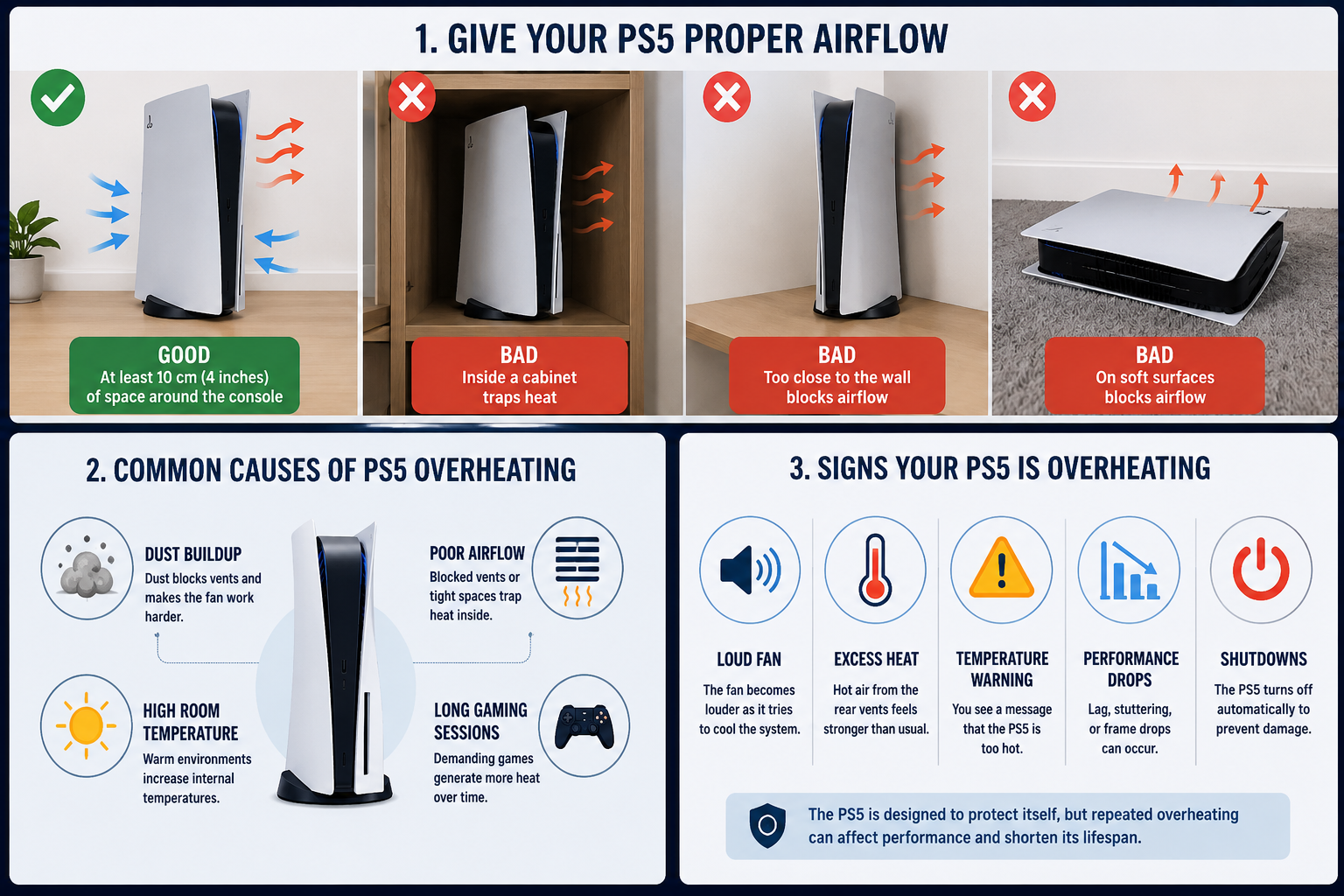
Here’s the good news: in most cases, overheating is caused by the environment around the console rather than a hardware defect.
Signs your PS5 is overheating
A PS5 too hot warning usually isn’t the first sign something is wrong. Most players notice smaller clues beforehand. Maybe the fan suddenly sounds louder than normal. Maybe the air coming from the back feels hotter than it used to. Sometimes performance starts dipping before any warning message appears.
Watch for these signs:
- Loud fan noise as the cooling system works harder to remove heat.
- Excessive heat coming from the rear vents.
- Performance drops, including lag, stuttering, or frame rate dips caused by thermal throttling, where the PS5 automatically reduces performance to lower temperatures.
- Temperature warnings telling you the console needs to cool down.
- Unexpected shutdowns, which are designed to protect internal components from damage.
Fun fact: the PS5 can automatically shut down when temperatures become unsafe, helping prevent permanent hardware damage.
How to stop PS5 overheating
If your PS5 keeps overheating, there are several things worth trying before assuming something is broken.
- Turn it off and let it cool down. If you receive a temperature warning or the console shuts down unexpectedly, power it off completely and let it rest for 30–60 minutes before turning it back on.
- Give it room to breathe. Leave at least 10 cm (4 inches) of space around the console for proper airflow.
- Clean the vents regularly. A quick cleaning every few months can prevent dust from restricting airflow.
- Keep it away from heat sources. Avoid direct sunlight, radiators, and enclosed entertainment units.
- Avoid soft surfaces. Placing the PS5 on carpets, rugs, or blankets can block airflow and trap heat.
- Take occasional breaks. This is especially helpful during marathon gaming sessions.
- Move it to a cooler room. Lower ambient temperatures can significantly improve cooling performance, especially during summer months.
- Consider professional repair. If overheating continues after cleaning, improving ventilation, and allowing the console to cool down, the cooling fan or another internal component may need inspection.
For most players, the solution ends up being much simpler than expected. A little cleaning and better airflow often solve the problem.
Final verdict
Most overheating problems don’t happen because a PS5 is defective. More often, the console is simply dealing with dust, restricted airflow, or a room that’s warmer than ideal.
Keep an eye on warning signs like louder fan noise, temperature alerts, or unexpected shutdowns. They’re usually the system’s way of telling you something needs attention before a bigger issue develops.
Knowing how to stop your PS5 from overheating comes down to three simple habits: keep the console clean, give it plenty of ventilation, and avoid excessive heat exposure.
A PS5 can handle thousands of gaming hours without trouble. Giving it enough ventilation, keeping it reasonably clean, and avoiding excessive heat exposure doesn’t take much effort, but it can make a noticeable difference over time.
The content on our website is provided for informational purposes only. We strive to keep our news accurate and up to date, but we cannot guarantee its completeness, reliability, or absolute accuracy.
ps5.news is not responsible for any errors, omissions, or decisions made based on this content. Any actions you take after reading our materials are at your own risk. Always verify important information through official sources where possible.
Articles by this author